What is on the Recovery jobs page?
The page has three parts, top to bottom: Restore to a point in time, then Every restore Actorly has run, and a button What Actorly can put back that opens a window with a section for each kind of record and the fields Actorly can put back in a list. A line beside Preview changes, inside the Restore to a point in time section, shows how many fields can be put back and your plan's limit: Unlimited restores on Actorly Restore, or 1 restore every 30 days on Actorly Watch. On Actorly Restore it reads "Choose a date and a time." until you have set both, and "Choose at least one section." until a section is ticked. There are no tabs and no stat cards. While a job is running the page refreshes by itself. The list holds the newest 50 restores of one field and the newest 20 restores to a date and time, with no paging.
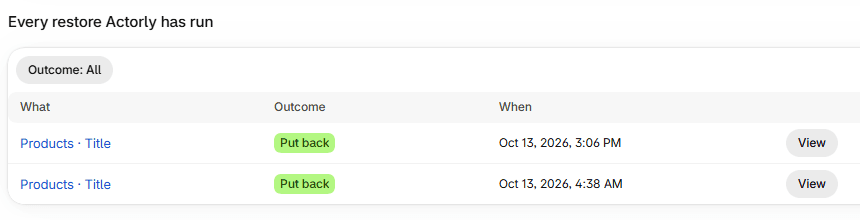
How do I find a restore?
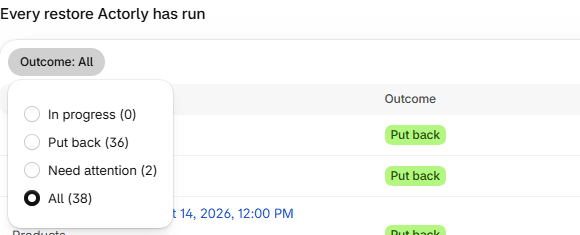
What does each outcome mean?
| Outcome | What it means | What to do |
|---|---|---|
| Waiting, Checking, Writing, Reading back | The restore is in progress, at that step. | Wait. Nothing needs you. |
| Put back | The restore finished and Actorly read the value back from Shopify to confirm. | Nothing. |
| Declined - it had changed | The field no longer held the value Actorly expected, so Actorly wrote nothing for it. | Look at what changed first, then try again. |
| Did not complete | The restore failed. The row gives a short reason; the step it stopped at is in the window the row opens. | Check the resource in Shopify before trying again. See A restore did not finish: what to do. |
| Outcome unknown | "Actorly lost track of this restore. Your store may or may not have changed, so check this resource's history before trying again." | Check the resource's history before trying again. |
A restore to a date and time is one row with its own words: Running, Put back, Needs review, Stopped or Outcome unknown. Inside its window an individual field can read Cancelled, which means it was not attempted because the job was stopped.
Need attention in the Outcome list means a restore that failed, was declined or stopped moving. A declined restore is Actorly working as designed: it stopped rather than overwrite a different value.
What does the page say when a list is empty or cannot be read?
| What the page says | What it means |
|---|---|
| No restores yet. | No restore has started. To try one, open a change in Changes and choose Restore this value. |
| Nothing is being restored right now. | The In progress filter is chosen and nothing is in progress. |
| No restore has finished yet. | The Put back filter is chosen and nothing has finished. |
| Nothing needs your attention. Every restore either finished or was declined cleanly. | The Need attention filter is chosen and it is empty. |
| This is a problem reaching your data, not a sign that nothing has happened. | Actorly could not read your restore history. Reload and try again. |
What does a restore to a time look like here?
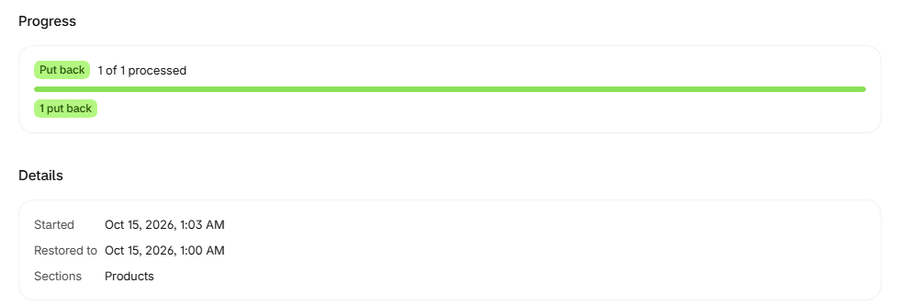
A restore to a time shows as one row, "Point-in-time restore to" the date and time, with a count of items processed, for example "3 of 3 processed". Choose View to open the job window: Progress, Started, Restored to, Sections, and an outcome for each item. See Restore products to a date and time.
On Actorly Watch and on Actorly Restore
The same list serves both plans. The line beside Preview changes reads 1 restore every 30 days on Watch and Unlimited restores on Restore. On Watch, the Restore to a point in time section is switched off with "Part of Actorly Restore". A restore that succeeded counts against the Watch allowance, and one still running holds it for up to 5 minutes. A declined, failed or refused restore does not count.
A worked example
Sample: the list has four rows. A title restore shows Put back. A price restore shows Declined - it had changed, because the price no longer held the value Actorly expected when it checked, so nothing was written for it. A tag restore shows Did not complete, with "Stopped at: Writing the value" in its window. An older restore shows Outcome unknown. Outcome: All shows All (4); choosing Need attention shows Need attention (3): the declined, failed and unknown rows. On Overview, Restores that did not finish would count the declined and failed ones from the last 30 days.
Frequently asked questions
The page is empty. Did something go wrong?
No. It says "No restores yet" until Actorly starts one.
Where are the tabs?
There are none. The list has an Outcome filter, a button that reads Outcome: All, with a count on each choice inside it.
What do I send support?
The Job ID shown in the banner after a restore failed, or under Technical details when you open it later, with the step it stopped at.
Why does a restore say Declined - it had changed?
The field no longer held the value Actorly expected when it checked, so Actorly wrote nothing rather than overwrite it. For a single field that check is made when you confirm; for a restore to a date and time it is made against the summary you approved.
Does Put back mean the field is right?
It means Actorly wrote the value and Shopify's read-back matched it. If Actorly lost track of a restore midway, it can later settle the row as Put back when a later read of Shopify shows the target value.
Do restores count against my plan?
On Actorly Watch, one restore in any rolling 30 days. A restore that succeeded counts, and one still running holds the allowance for up to 5 minutes. On Actorly Restore, restores are unlimited.