What do I need before I start?
- The field must be one Actorly can put back. The Recovery jobs page lists them under What Actorly can put back, and the change window shows Restore this value only for them. See What Actorly can and cannot put back.
- Your plan must include the restore. Actorly Watch includes one restore in any rolling 30 days, on basic details. A product's status, a variant's price and a collection's sort order need Actorly Restore, which includes unlimited restores.
- The change must be one Actorly recorded with an earlier value. A field that was added by the change has no earlier value to put back. Actorly has no earlier value for a change made before it was installed, so it cannot put one back.
- The item must still exist and the value must not be protected. A deleted item and a protected value are refused.
How do I restore one field?

What does Actorly check before it calls it Restored?
Before it writes, Actorly checks your plan, that the field is on its restore list, and that the item still exists. Then it works through five steps in order. The value written always comes from Actorly's own record of the change, never from the request.
| Step | What Actorly does |
|---|---|
| Reading the current value | When you choose Yes, restore it, it asks Shopify what the field holds right now. |
| Comparing with the current value | It compares that live value with what it read for this restore. If the field changed in that moment, Actorly stops and writes nothing. |
| Writing the value | It changes that one field, and nothing else. |
| Reading it back | It asks Shopify again what the field holds now. Shopify answering "accepted" is not the same as the value being right. |
| Checking it matched | Only if the value Shopify now holds equals the value put back is it called Restored. |
The change's Restore history shows the step a restore stopped at, in a Stopped at column, only when one stopped. If a check before the write fails, nothing is changed. If Actorly cannot confirm the value after writing, it says so and asks you to look at the field in Shopify.
What do I see at each stage?
| Stage | What the app says |
|---|---|
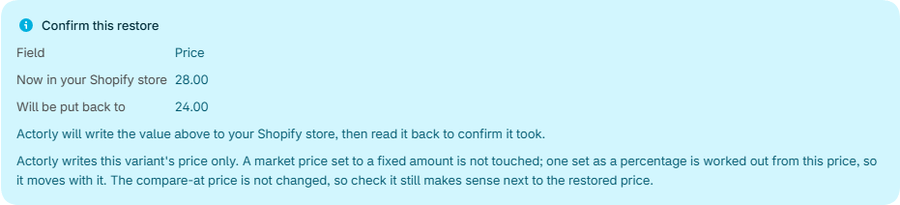
| The confirm panel opens | "Actorly will write the value above to your Shopify store, then read it back to confirm it took." If the live read fails: "Actorly could not read it just now. It reads it again before it writes anything." |
| Working | "Checking, restoring, and reading it back" |
| Finished | Restored, "Put back to" the value |
| Stopped | The message for the case, with "Stopped at: the step" and "Job ID for support" in the banner right after the click |
What should I check for each kind of field?
A few fields have a check or a scope worth knowing before you confirm.
- Tags. A restore overwrites the whole tag list. The panel names the current tags it would remove, read live: "Restoring will remove these tags, which are on the product now: ...", or "No tags will be removed...". If it could not check: "Actorly could not check which tags this will remove. Restoring overwrites the whole tag list, so open the product in Shopify first if you are unsure."
- A variant's price. Actorly writes this variant's price only. A market price set to a fixed amount is not touched. One set as a percentage is worked out from this price, so it moves with it. The compare-at price is not changed, so check it still makes sense next to the restored price. A price is put back as the exact string, so "19.90" stays "19.90".
- A product's description. The full HTML is restored. An edit made anywhere in a long description since is a conflict, and Actorly stops.
- A product's theme template. Actorly checks that your published theme still has a product template with that name, and refuses before writing if it does not. An empty name means the default template.
- A shipping profile's name. Only attempted when Shopify says the store uses legacy shipping. On a store whose shipping moved to Markets, or where Actorly cannot tell, it refuses.
- A product's status. Needs Actorly Restore.
If something goes wrong
Each message says what Actorly did. Where the app says what happened to your store, the table quotes it; where it does not, the table says so.
| What you see | What the app says about your store | What to do |
|---|---|---|
| A message that begins "Actorly did not change anything." and says the field had been edited (Declined - it had changed, or Not restored, the value had changed) | "did not change anything" | Look at the field's newer change first, then start again if you still want the old value. |
| "You have used the restore included in your plan in the last 30 days. Actorly Restore includes unlimited restores." | No restore was started. | Wait, or see Compare Actorly Watch and Actorly Restore. |
| "Too many restores in the last minute. Wait a moment and try again." | No restore was started. | Wait a moment. |
| "Actorly cannot put this field back. Only some fields can be restored, and this is not one of them yet." | No restore was started. | See What Actorly can and cannot put back. |
| "Actorly could not find this in your store. It may have been deleted." | No restore was started. | Check the item in Shopify. |
| "Actorly did not change anything. The restore stopped during its checks, before it wrote to your store. Check that the resource and the value you are restoring still exist in your store, then try again." | "did not change anything" | Check the resource, then try again. |
| "Actorly cannot restore shipping on this store yet. Either Shopify has moved this store's shipping setup to Markets, or Actorly could not confirm which setup it uses. Nothing was changed." | "Nothing was changed." | Nothing to do on this store. |
| "Actorly could not reach the server. Nothing was changed." | "Nothing was changed." | Check the field in Shopify, then try again. The app shows this for any request that failed to complete, so it cannot rule out a write that finished just before the connection dropped. |
| "The restore did not complete. Your store may be unchanged, or partly changed. Check the resource in Shopify before trying again." | "may be unchanged, or partly changed" | Check the resource in Shopify before trying again. If the window shows a Job ID, give it to support. A failure of Actorly's own first read can show this message with no step and no Job ID. |
| Outcome unknown, "Actorly lost track of this restore. Your store may or may not have changed, so check this resource's history before trying again." | "may or may not have changed" | Check the resource's history before trying again. |
When a restore stops, a short reason may be shown: "Shopify refused the change."; "The value changed again since this change was recorded."; "The record no longer exists in your store."; "Actorly could not reach Shopify."; "Shopify took the change, but the value read back did not match."; or "Actorly could not finish this restore." More is in A restore did not finish: what to do.
What is different on Actorly Watch and on Actorly Restore?
| Actorly Watch | Actorly Restore | |
|---|---|---|
| How many restores | One in any rolling 30 days. Overview shows "of 1 in 30 days". | Unlimited |
| Which fields | Basic details. A product's status, a variant's price and a collection's sort order show "Included with Actorly Restore". | Every field Actorly can put back |
| What counts against the allowance | A restore that succeeded. One still running holds the allowance for up to 5 minutes, so a second restore started straight away can be refused. A refused, declined or failed restore does not count. | Not applicable |
A worked example
Sample: on Monday a staff member changes the title of "Example tee" to "Example tee, blue". You open the change and choose Restore this value. The panel shows Field Title, Now in your Shopify store "Example tee, blue", Will be put back to "Example tee". You choose Yes, restore it. The window says "Checking, restoring, and reading it back", then Restored and "Put back to Example tee". Shopify then reports the title edit, and Changes shows it as one more row for the title, like any other edit. Actorly does not mark a row as made by a restore. The restore itself is on Recovery jobs as Put back, and in the change's Restore history with its date and outcome. The stage order is the point: the word Restored appears only after the value was read back from Shopify and matched.
If the title had already changed again and Actorly had recorded that, the Restore column would have said "A newer change exists on this field" and offered no button.
Frequently asked questions
What if someone edited the field after the change?
If Actorly has already recorded that newer edit, the Restore column says "A newer change exists on this field" and the button is not offered. If the field changes in the moment Actorly checks it for your confirmation, it stops and writes nothing: "Actorly did not change anything." An edit made after the panel opened and not yet recorded is not caught, so close the panel and open it again if it has been waiting.
Can I restore a deleted product?
No. Actorly cannot bring a deleted product back. It keeps the deleted product's record and its last recorded values, so you can see what it was and, on Actorly Restore, export them.
Can I put back several fields at once?
From a change, Restore this value puts back one field at a time, and you confirm each one. Actorly Restore can also put products back to how they were at a date and time you choose. Available on Actorly Restore. Up to 500 fields in one go. Covers the fields Actorly can put back, which are listed in the app. Items deleted since then are left out, and so are fields Actorly has no recorded value for. A field someone has changed since you looked at the summary is not overwritten. See Restore products to a date and time.
Does the free restore reset each month?
It is one restore in any rolling 30 days, not a calendar month. Overview shows "of 1 in 30 days", and when the restore is used the app says "You have used the restore included in your plan in the last 30 days."
Why is there no Restore this value button?
The field is not one Actorly can put back, the change has no earlier value, or your plan does not include it. The Restore column gives the reason in the app's words.
Who is shown as making the restore?
The row in Changes is an ordinary change that Shopify reports, so its Who column follows the same rules as any other row, with the answer and its confidence word. Actorly does not label it as a restore, and neither Recovery jobs nor the Restore history shows a person or an app for it.
Does Restored mean the value is right everywhere?
It means Shopify now holds the value Actorly put back, read from Shopify after the write. For a price it does not touch a market price set to a fixed amount or the compare-at price.
What do I send support if it fails?
The Job ID for support from the banner, or the Job ID under Technical details when you open the restore later, and the step it Stopped at.