This guide describes restoring Products. The form lists other sections too, and this help center does not describe them yet. For more than one item the same sentences count them in the plural.
What do I need before I start?
- Actorly Restore. On Actorly Watch the form is switched off and the page says "Part of Actorly Restore" and "Restoring to a point in time is part of Actorly Restore. On your plan you can still put back one field at a time, from any change." See Restore one field to an earlier value.
- A time Actorly has history for. Actorly can only put back what it recorded. A field with no value recorded for the time you choose is left out.
- A finished import. While Actorly is still reading a kind's history, the preview warns that it may be missing fields, and Approve stays off until the import has finished. If an import failed or its state cannot be read, Approve stays off in the same way, and "once the import has finished" may not come until the import is fixed.
- No other restore to a time running. Only one runs at a time.

How do I restore products to a date and time?
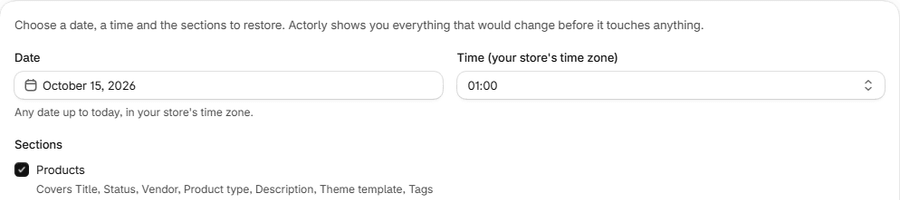
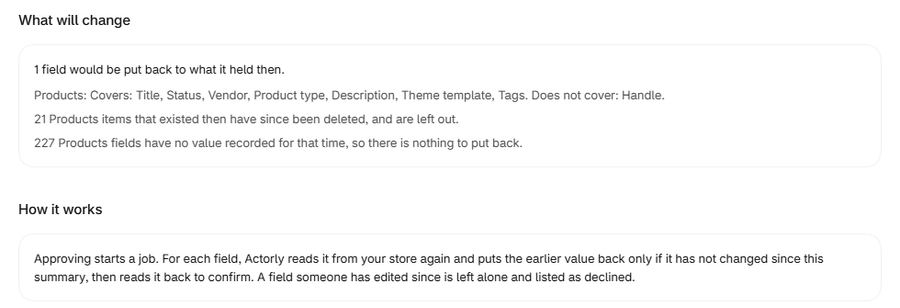
The unit is a field, not a product: three product titles are 3 fields.
What will the preview tell me?
The summary window reads "N fields would be put back to what they held then." with "Covers: ..." for each section. For Products it also says "Does not cover: Handle." The form itself shows only "Covers", and a "Does not cover" line appears only for Products and Shipping profiles. The preview never drops anything silently: what it leaves out is counted.
| The preview says | What it means |
|---|---|
| "1 Product has no recorded state at that time, so Actorly cannot say what it held." (for more than one: "3 Product items have no recorded state at that time, so Actorly cannot say what they held.") | Actorly was not recording yet, or the item did not exist. It is left out. |
| "1 Product that existed then has since been deleted, and is left out." | A deleted item cannot be put back. |
| "1 Product field has no value recorded for that time, so there is nothing to put back." | Nothing to write. It is left out. |
| "Nothing would change. Every field Actorly has a value for in the chosen sections already matches that time." | There is nothing to restore. |
| "Actorly is still reading your Products history, so this preview may be missing fields." | The import has not finished, so a preview that would otherwise be empty may be incomplete. There is nothing to approve. |
| "Actorly is still reading your Products history, so this summary may be missing fields. Approve once the import has finished." | The summary window shows this beside an Approve button that is switched off until the import has finished. |
When nothing would change but something was excluded, the summary lists only the exclusions and does not say "0 fields would change".
What happens when I approve?
Approving starts a job. For each field, Actorly reads it from your store again and puts the earlier value back only if it has not changed since the summary, then reads it back from your store to confirm. A field someone has edited since is left alone and listed as declined.
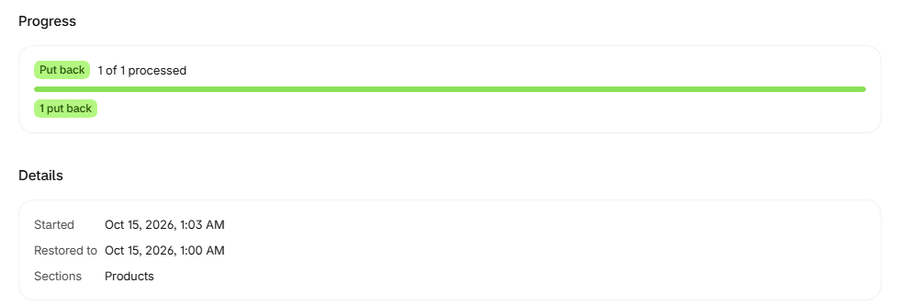
Each field is restored on its own, so a conflict or failure in one field never touches another, and a job that ends with some fields declined is normal. The job window shows Progress ("N of M processed"), the Started and Restored to times, Sections, and an outcome for each item. A state word summarises the job: Running, Put back, Needs review, Stopped or Outcome unknown.
| Count in the window | What it means |
|---|---|
| N put back | The field was written and read back. |
| N declined | "Declined means the value in your store had changed since the summary, so Actorly left it alone rather than overwrite a newer edit." |
| N did not complete | The restore did not finish for that field. Check the resource in Shopify. |
| N not attempted | The job was stopped, or your plan changed, before that item started. |
| N in progress, N waiting | The job is still running. |
To stop a running job, choose Stop N remaining. "Stopping prevents new items from starting. An item already being put back finishes, and nothing already restored is undone." After a stop the window says "This job was stopped. N items were never started, so nothing was changed for them. Items already put back stay put back."
If something goes wrong
These refusals are defined in the app. They are described here as app behaviour.
| What you see | What it means | What to do |
|---|---|---|
| "That would change {N} fields, more than the {N} Actorly can list at once. Nothing was listed. Choose fewer sections or a later time." | The request is bigger than Actorly lists, so nothing was listed. | Choose fewer sections or a later time. |
| "Actorly could not read your history just now. This is a problem reaching your data, not a sign that nothing would change." | A read failed. | Try again in a moment. |
| "Your history changed while you were looking at this summary. Close it and preview again, so you approve what is current." | The summary is out of date. Nothing was written. | Close it and preview again. |
| "A restore is already running" with View job | Only one runs at a time. | Open the job or wait. |
| "Actorly is still reading your history, so it cannot plan this restore yet." | The import has not finished. | Try again once it has. |
| "Nothing would change any more..." | Every field already holds that value. | Nothing to do. |
| "Actorly could not start the restore. Nothing was changed. Try again in a moment." | The job did not start. | Try again. |
| "Actorly lost track of this job. Items that were midway may or may not have changed your store, so check those resources before running it again." | The job's processing stopped midway. | Check those resources in Shopify. |
What is different on Actorly Watch and on Actorly Restore?
On Actorly Restore the builder works. On Actorly Watch it is shown switched off, with "Part of Actorly Restore" and a See plans button; you can still put back one field at a time from any change, one in any rolling 30 days. The server refuses the request on Watch as well, not only the button. This refusal is defined in the app's code and tests.
A worked example
Sample: on Tuesday afternoon a bad import renames three products. On Actorly Restore you open Recovery jobs, choose Monday's date and 18:00, tick Products and choose Preview changes. The summary says "3 fields would be put back to what they held then." and lists each product's title at that time beside its title now, with "Covers: Title, ..." and "Does not cover: ..." lines. You choose Restore 3 fields. The job window shows "3 of 3 processed" and "3 put back" and the state Put back. Shopify reports the three title edits and Changes shows them as ordinary rows, not marked as a restore. Had a colleague edited one title after you previewed and Actorly not yet recorded it, that field would have been declined and the other two put back. If Actorly had already recorded the edit before you approved, it would have asked you to preview again instead. Actorly gives no time estimate for a job: follow it on Recovery jobs.
Frequently asked questions
Does it cover everything in my store?
No. It covers the fields Actorly can put back, which are listed in the app and in What Actorly can and cannot put back. It never changes an order or a customer, and inventory counts, themes and store settings are not restorable. Available on Actorly Restore. Up to 500 fields in one go. Covers the fields Actorly can put back, which are listed in the app. Items deleted since then are left out, and so are fields Actorly has no recorded value for. A field someone has changed since you looked at the summary is not overwritten.
Can it bring back a deleted product?
No. Items deleted since then are left out. Actorly cannot bring a deleted product back. It keeps the deleted product's record and its last recorded values, so you can see what it was and, on Actorly Restore, export them.
What if someone edits a field while I am looking at the summary?
Actorly will not overwrite it. If Actorly has recorded the edit while you were looking, it asks you to preview again. If the field differs from the summary when the job reaches it, the field is declined and left alone.
Which plan includes it?
Actorly Restore. On Actorly Watch you can put back one field at a time, one in any rolling 30 days. See Compare Actorly Watch and Actorly Restore.
Is this the same as restoring my whole store?
No. Actorly never restores a whole store. It puts back fields it can put back, for the section you choose.
Can I choose other sections, such as variants or collections?
The form lists other sections. This help center describes restoring Products and does not yet describe the others.
Does the job tell me how long it will take?
No. Actorly gives no time estimate. The job window shows how many fields are processed.