What do I need before I start?
- Actorly Restore. On Actorly Watch, Actorly checks a theme but saves no copy of its files, so there is nothing to download. The page says "Saving theme files so you can download them is part of Restore".
- Permission to read themes. If it has not been granted, the theme reads Access needed. Open Actorly from your Shopify admin and approve the permission request when Shopify shows it. Backups start after that.
- A scheduled check to have run. The first backup is not instant: a new Actorly Restore store starts with every theme marked Not backed up yet.
- A theme that is published or unpublished. "Development, demo and archived themes are not backed up." Locked and managed themes are not backed up either.
How do I download a theme?
When does Actorly back up themes?
On a schedule. Every store's themes are checked on Sundays, and Actorly Restore stores on the other days too, but only Actorly Restore saves the files. A first backup that does not fit in one run is finished by a regular follow-up pass, and the window estimates the rest: "At the current pace, about N more hours". Actorly gives no minutes or hours for a first backup beyond that estimate, and a large theme takes several passes.
What does each status mean?
| Status | What it means | What to do |
|---|---|---|
| Not backed up yet | "Actorly has not backed up this theme yet. This is not the same as a theme with no changes: nothing has been read from it. The first backup runs at the next scheduled check." | Wait for the next scheduled check. |
| Backing up | Actorly is saving the files. "Backing up: N of M files saved" | Wait. |
| Backed up | "Every file is saved." The row reads "Backed up" and a date, with the number of files and the size. | Choose Download. |
| Needs attention | "N files could not be saved. Download is available when every file is saved." | Open the theme to read the reason for each file. |
| Failed | "The last backup did not finish. Reason: ... Actorly tries again at the next scheduled check." | Wait for the next check. |
| Removed from your store | "This theme is no longer in your Shopify store. Actorly stopped backing it up on {date}." It names its last complete backup, or says "A complete backup was not finished before it was removed". | Use the last backup if there is one. |
| Access needed | The permission to read themes has not been granted. | Approve it when Shopify shows the request. |
| Access not confirmed | "Actorly could not confirm whether it can read your themes, so it is not claiming a backup either way" | Open Actorly from your Shopify admin. |
| Checked, files not saved | On Actorly Watch: Actorly checked the theme and says how many files changed, but did not save them. | See Compare Actorly Watch and Actorly Restore. |
What does the theme window show?
The window shows Details (role, when it was backed up, the run, files saved, size and the plan), Needs attention (a table of File, Reason and Size), Files (Search files, filters All files, Saved, Waiting, Could not be saved, Not saved, and a Change column reading Added, Modified, Removed or Unchanged) and Snapshots, with a Result of Complete, Partial, Failed or Checked only, and "First backup: every file is new" for the first. Notes at the bottom carries how to use the backup.
Why could a file not be saved?
Each file in the Needs attention table gives one reason, and says "Actorly tries again at the next pass" or "Actorly will not retry this file".
| Reason | What it means |
|---|---|
| The file's content was not available | Actorly could not get the file's content. |
| Shopify gave an address Actorly would not fetch | The file's address was refused. |
| The file could not be fetched, Fetching the file timed out, Shopify answered with an error | The read failed. |
| The file's address redirected, which Actorly does not follow | Actorly does not follow redirects. |
| The file is larger than 15 MB | A file over the size Actorly saves. |
| The file came back empty | Nothing was returned. |
| Actorly could not store the file, could not confirm the stored file, or could not read the file back | A problem on Actorly's side. |
| Waiting for the next pass | The file is queued. |
| The file did not match the checksum Shopify lists for it, and the same twice in a row | The saved bytes did not match what Shopify lists. |
When the whole backup fails, the reason is one of: Shopify no longer accepts Actorly's access; the list of theme files could not be read; Shopify asked Actorly to slow down; the theme has more files than Actorly reads; the permission to read themes is missing; or Actorly could not record the backup.
What limits apply to a download?
A download is limited to 32 MB and 900 distinct files, per theme. A theme can be saved in full and still be larger than one download allows: the row reads Backed up and says "This theme is larger than one download allows ({limit}). Actorly cannot offer it as one zip yet." The limit of 900 counts distinct stored files, so two files with identical content count once toward it. The 32 MB total adds up every file, so identical files each count toward it.
What if the download fails?
| What the page says | What it means |
|---|---|
| This backup is not complete, so it cannot be downloaded | Wait for Backed up. |
| A saved file is missing. Contact support. | A saved file could not be found. |
| This theme is larger than one download allows | See the limit above. |
| The download failed a check, so it was not given to you. Try again; if it repeats, contact support. | The zip failed an integrity check. |
| The download did not start. Check your connection and try again. | A network problem. |
| We could not read your plan, so we did not start the download | The plan could not be read. |
| Saving and downloading theme files is part of Restore | Your plan does not include it. |
How do I use the ZIP?
The app's own note says: to use a backup, download the ZIP, then in your Shopify admin go to Online Store > Themes > Draft themes > Import > Upload zip file.
A worked example
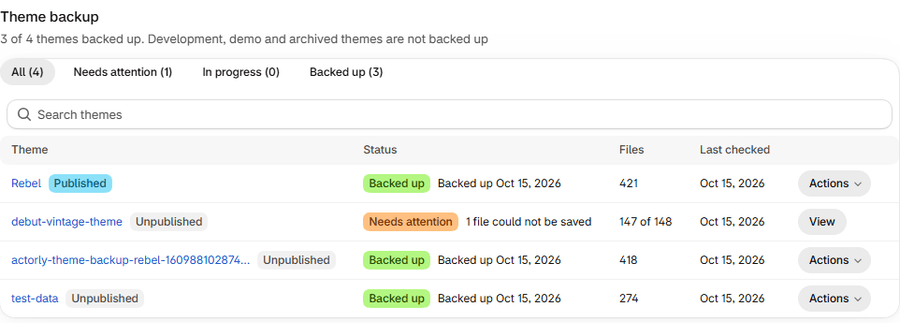
Sample: on Actorly Restore, a store has four themes. The Theme backup page says "3 of 4 themes backed up". Three rows read Backed up with a date and a file count; one reads Needs attention with "1 file could not be saved". You open that theme: the table says the file is larger than 15 MB, and "Actorly will not retry this file". Download stays off until every file is saved, so you cannot download that theme as one ZIP. You open a Backed up theme, choose Download, then import it as a draft in Shopify.
Frequently asked questions
Is theme file backup included on Actorly Watch?
No. It is part of Actorly Restore. Actorly Watch keeps file information but not the files.
Does Actorly change my live theme?
No. Actorly only reads your themes. A backup is a ZIP you download.
Why does my theme say Not backed up yet?
The first backup builds after Actorly's first scheduled check. Until then the theme reads Not backed up yet, and the Download button is not available.
Can Actorly put my theme back?
No. Shopify lets an app change a theme only with an exemption that Shopify grants, and Actorly does not hold one. Download the ZIP and import it in your Shopify admin.
Why can I not download a theme that says Backed up?
It may be larger than one download allows: the row says so.
How often are themes backed up?
On a schedule: daily on Actorly Restore, which saves the files. Actorly does not quote how long a backup takes.
What happens to a theme I delete in Shopify?
The row reads Removed from your store and names its last complete backup, if there is one.