How long is my history kept?
| Plan | History kept | What happens to older history |
|---|---|---|
| Actorly Watch | 3 months of change history (90 days) | Older history is removed, after a first notice that names the date. A daily clean-up then keeps removing anything older than 90 days, without a second notice. |
| Actorly Restore | "Unlimited change history, kept while you stay on Actorly Restore" | Nothing is removed for age. |
On Overview, History kept shows your plan's window as "90 days" on Watch and Unlimited on Restore. The plan screens say "3 months"; the two are the same window.
What do I see before older history is removed?
You are told before the first removal, once, with a 14-day notice. After that notice has run out, the daily clean-up removes older history each day without a further warning, so a Watch store with more than 90 days of history can lose a day of history daily.
- A banner on every page, while the 14 days run: "Older history will be removed on {date}" with "Your plan keeps 3 months of history. Changes older than that will be removed from {date}. Actorly Restore keeps all of your history." and a See your plan button. The date is in UTC. The banner goes by itself when the date passes or a Restore plan is confirmed.
- A notification. The bell says "Your plan keeps 3 months of history. Changes older than that will be removed from {date}. Actorly Restore keeps all of your history." See Understand Actorly notifications.
- A line on the Account page beside the Watch plan: "On Actorly Watch, changes older than 3 months are removed 14 days after you switch."
If Actorly cannot confirm your plan, nothing is deleted. A purge runs only for a store whose Actorly Watch plan has been confirmed within the last 48 hours, or whose Restore subscription Shopify reports as cancelled with its paid period over. An unreadable, unconfirmed, uninstalled or never-chosen plan is never purged. For the day-by-day notice after a downgrade, see Upgrade, downgrade or cancel Actorly.
What do I see after history has been removed?
Every screen that could show the gap says so.
| Where | What it says |
|---|---|
| Changes | A page whose whole range is before the removal reads Outside your plan's history and "Removed history cannot be brought back." When a list does show rows, a quiet line above them says "History before {date} is outside your plan's 3 months, so changes before then may be missing here." After a removal it says "History before {date} was removed under a plan that kept 3 months, so changes before then may be missing here." |
| A cell or a count | History removed, or "Changed N times since {date}, most recently {date}." |
| Overview, History kept | "Before {date}: removed" |
| A change window | "Changes before {date} were removed. This shows what Actorly still holds from {date} on." |
| An export | "Actorly history before {date} (UTC) was removed under the plan's history window. This export holds only the history Actorly still has from {date} on. Removed history cannot be brought back." |
To keep older history, export it on Actorly Restore before it is removed. Moving to Restore after history was removed does not bring it back.
How do I see what is taking the room?
A figure marked "at least" is a lower bound: "This store holds so many files that Actorly stopped counting to keep this window quick." If a figure is missing, no total is shown: "A total needs every figure, so none is shown."
What happens if space runs low?
On Actorly Restore the section says "On this plan your history is not removed to make room. Automatic archiving to long-term storage is not built yet, so Actorly watches this store's space and warns you here before it runs out." When the store is using 70% or more of its space, on either plan, a banner appears: "This store is using most of its space." It adds "Actorly does not delete your history. Automatic archiving is not built yet, so if this store reaches its limit, new changes cannot be recorded until space is freed. Contact us before that happens."
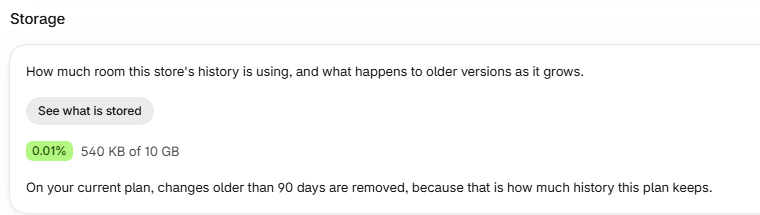
On Actorly Watch the section says "On your current plan, changes older than 90 days are removed, because that is how much history this plan keeps."
If something goes wrong
- "Actorly could not measure this store's storage". "This is a problem reaching your history, not a statement about how much space it uses." Reload.
- "Actorly could not measure the stored files". "This is a problem reaching them, not a statement about how much they take. The change history figure above is unaffected. Open this window again to retry."
- "Actorly could not read your plan, so it cannot say what happens as this fills." The plan could not be read. See Check your store details and choose a language.
A worked example
Sample: a store on Actorly Watch opens See what is stored and sees 540 KB of 10 GB used. Change history is the largest bar. Under Records in your change history it shows Changes 536 and Saved versions 2,252. The note says that on this plan changes older than 90 days are removed. Export is not available on this plan. When history is about to leave, a banner on every page says "Older history will be removed on" a date and the bell gives the same date, which is the moment to decide whether to move to Actorly Restore.
Frequently asked questions
How far back does my history go?
3 months on Actorly Watch, unlimited on Actorly Restore. Changes are recorded from the day you installed Actorly.
Can I keep older history before it is removed?
On Actorly Restore you can export it. An export holds only the history Actorly still has. See Export your change history to CSV or JSON.
Does moving to Restore bring back history that was removed?
No. History already removed under Watch's window is not recreated.
Will I be told before history is removed?
Before the first removal, yes. Actorly shows the date in a banner and in Notifications, with a 14-day notice after a downgrade. After that notice, the daily clean-up removes older history without a new warning. If Actorly cannot confirm your plan, nothing is deleted.
What does "at least" mean on a storage figure?
It is a lower bound. Actorly stopped counting so many files to keep the window quick.
Is Restore's history really unlimited?
Unlimited in that no history is removed for age. The app says plainly that automatic archiving is not built and that a store which reaches its limit cannot record new changes until space is freed, and it warns you first.
Why does Overview say 90 days but the plan says 3 months?
They are the same window.