How do I use the bell?
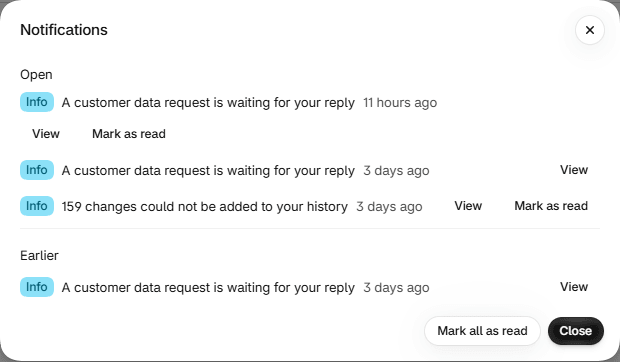
What can raise a notification?
Exactly four things. The severity badge reads Critical, Warning or Info. It is worked out when you open the bell, so it can change while a notification waits.
| Notification | Severity | What it means | View goes to |
|---|---|---|---|
| N changes could not be added to your history | Warning, and later Info once it has settled | Some changes happened that Actorly could not record. | Overview, where the gap details open. See Some changes could not be added to your history. |
| Importing your resource did not finish | Always Critical | Actorly's first read of that kind of record failed, so changes to it are not being recorded yet. | The Data room. See Is Actorly recording my store?. |
| A customer data request is waiting for your reply | Info at first, Warning as the deadline nears, Critical once it is due | Shopify sent a request on behalf of a customer. | Data and privacy, opening that request. See Answer a customer data request. |
| Your plan keeps 3 months of history. Changes older than that will be removed from a date. Actorly Restore keeps all of your history. | Always Warning | Older history leaves on the date shown. | Account, at the Plan section. See How long Actorly keeps your history, and storage. |
A notification is standing: there is one for each condition, and it closes when the condition clears. A data request closes when you Mark as handled or when the customer's data is erased, not when you download the file. The history notice is written before any history can be deleted, and closes when a confirmed Actorly Restore plan is seen. Notifications carry counts, times and kinds of record only, never a customer's value or a person's name.
What does the bell say when it cannot check?
| The bell says | What it means |
|---|---|
| We could not load your notifications | "This does not mean there is nothing new." Choose Try again. |
| We could not check for open items | "A gap in your history or a failed import may exist that is not listed here. This does not mean there is nothing open. Try again in a moment." |
| That did not save. Your notifications are unchanged. | A Mark as read did not go through. Try again. |
| You are all caught up | "Nothing needs your attention right now." Shown only when nothing is listed under Open or Earlier and Actorly could check. |
Where else do I see what needs attention?
On Overview, under Needs your attention. It lists restores that did not finish, resource types Actorly could not read, kinds not checked for deletions lately and more. See How to read the Actorly Overview. A gap shows as a banner at the top of Overview only, and on other pages as a "N changes not recorded" marker beside the status badge. A failed import shows as a banner on Overview and Changes.
A worked example
Sample: Shopify sends a customer data request on the 1st. The bell shows "A customer data request is waiting for your reply" with the badge Info and the count 1 beside Notifications. You choose View: the bell closes and Settings, Data and privacy opens on that request. Near the deadline the same notification reads Warning, and once it is due, Critical. You download the file, send it, and choose Mark as handled. The notification moves to Earlier. In the meantime you chose Mark as read on it once: it stayed in the list as read, because marking it read does not resolve the request.
Frequently asked questions
Does the bell say I have no problems?
Only when it says "You are all caught up", which it shows when nothing is listed under Open or Earlier and the check completed. If it could not check, it says that instead and does not claim there is nothing open.
I marked a notification as read. Is the problem solved?
No. Read only means you have seen it. A data request, for example, is resolved by Mark as handled, not by reading the notification.
Why does the plan notification say changes will be removed?
Your plan keeps a fixed amount of history, and changes older than that are removed from the date shown. Actorly Restore keeps all of your history.
Why did a notification change from Warning to Info?
A notice about changes that could not be added to your history is a warning for a while after the newest gap, and settles to Info afterwards. The severity is worked out each time you open the bell.
Does the bell tell me about restores?
No. It has four kinds only. A restore that did not finish appears on Overview under Needs your attention and on Recovery jobs, not in the bell.
Do notifications email me?
No. Notifications appear only in the bell inside Actorly.