What is on the Overview page?
The page is a stack of blocks. The date control, with Last 24 hours, Last 7 days, Last 30 days and Custom, sits in the page body.
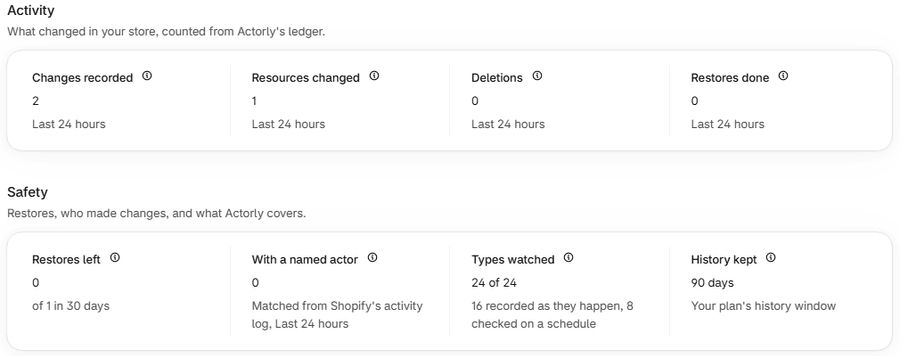
| Block | What it shows |
|---|---|
| Setup guide | The first-run steps and how many are done. Choose Show steps or Hide steps. It disappears once every step is done. |
| Activity | Changes recorded, Resources changed, Deletions and Restores done for the period. |
| Safety | Restores left, With a named actor, Types watched and History kept. |
| Store and plan | Your plan, restores used in the last 30 days, and Manage plan. |
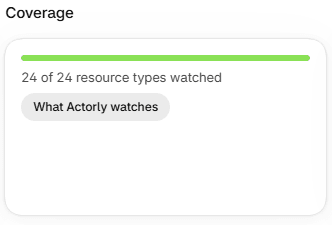
| Coverage | How many resource types are watched, and the What Actorly watches button. |
| Quick actions | View changes, Restore a value and Export history. |
| Checked on a schedule | The kinds Actorly re-reads on a schedule and when. |
| Needs your attention | What Actorly could not finish or read, or All clear. |
| Recent changes | The newest five changes in the period, with View all changes. |
| Most changed | The items with the most changes in the period. |
| Who is making changes | The people and apps Shopify's activity log matched, with how many changes have no named actor. |
Store and plan, Coverage and Quick actions sit side by side in one row. On Actorly Watch a dismissible callout follows the blocks.
How do I read the numbers?
Activity
A change is one edit to one resource, so a bulk edit that touches 40 products counts as 40 changes. Resources changed counts each item once, however often it changed. Restores done counts restores Actorly ran and verified against Shopify in the period. Each count has a small information icon with its definition.
Beside a count you may see a trend: an arrow with a percentage, No change or new. A trend appears only when a whole earlier period of the same length exists after you installed, so a new store shows none for a while. When the earlier count was small, from 1 to 19 changes, no trend is shown. A rise in Deletions is never presented as good news.
Safety
Three of these are not tied to the period: Restores left, Types watched and History kept. With a named actor follows the date range, and its caption names the period.
| Tile | What it says | What it means |
|---|---|---|
| Restores left | On Actorly Watch, a number "of 1 in 30 days"; on Actorly Restore, Unlimited | Watch counts one restore in any rolling 30 days. It is not a calendar month. |
| With a named actor | A count, "Matched from Shopify's activity log" and the period | Changes where Shopify's activity log let Actorly match a person or app, at any confidence. The match is a correlation, never proof. The other changes have no named actor: Unknown, or Not attributed yet while Actorly is still checking. |
| Types watched | "N of N", with "N recorded as they happen, N checked on a schedule" | Only kinds Actorly has finished importing and claims to record. Kinds Actorly does not track yet are in neither number. |
| History kept | "90 days" on Watch, Unlimited on Restore | Your plan's history window. The plan screens say "3 months"; 3 months and 90 days are the same window. |
Most changed and Who is making changes
Both are worked out from the newest changes in the period, and each says how many it counted: "Counted from all N changes in this period." or "Counted from the latest N changes in this period." In Who is making changes every name sits beside its confidence word, and the unnamed count covers both Unknown, which never changes, and Not attributed yet, which may.
What do the status badge and the banner say?
Beside the store name is a badge: Watching, Still importing, Import failed or Cannot read history, with "Checked N seconds ago". One banner at the top lists the true conditions: a failed import, an unreadable ledger, kinds not started, kinds still importing, and a permission Actorly does not have. A gap is its own one-line banner only when nothing else applies, and otherwise shows as a marker beside the badge. Only a failed import is shown in red. See Is Actorly recording my store? for every state.
A gap says "N changes could not be added to your history" and that there is nothing for you to fix. After it settles it becomes a calm line you can dismiss, and a marker "N changes not recorded" stays beside the badge. See Some changes could not be added to your history.
What does Needs your attention mean?
Each row names a condition Actorly has proven, most urgent first.
| Row | What it says | What you can do |
|---|---|---|
| Restores that did not finish | "These restores failed or hit a conflict in the last 30 days. Open Recovery to see which values were not put back." | Open Recovery jobs. See A restore did not finish. |
| Resource types Actorly could not read | "Actorly could not finish importing these, so changes to them are not being recorded yet." | Read Is Actorly recording my store?. |
| Resource types not checked for deletions lately | "...a list with no deletions is not a guarantee that none happened." | See find a deleted product. |
| History still importing | "Counts for these resource types are incomplete until their import finishes." | Wait for the import. |
| Resource types not watched yet | "Actorly has not started recording changes to these resource types." | Nothing to do. |
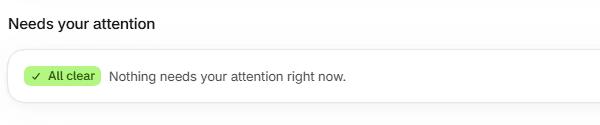
All clear appears only when no check failed to read and no gap is open. If a check could not be read, Overview says "Some checks could not be read right now, so Actorly cannot say nothing needs attention." If a gap is open and no row applies, the card is hidden, because a gap is stated at the top and in the bell and "All clear" beside it would be false.
What are the Setup guide, Recent changes and Quick actions?
- Setup guide. On first run it lists the steps, each marked from what Actorly observes rather than what you tick: Choose a plan, Let the first sync finish and Try a restore, and any other step the guide shows. A restore step is done once any restore has succeeded. The guide counts the steps complete.
- Recent changes. The newest five changes in the period, with a Deletion check column that reads Checked lately, Not checked lately or Not checked for deletions.
- Checked on a schedule. A table with Type, How often, Last checked and Next check. How often is Daily on Actorly Restore and Weekly on Actorly Watch. A row may read Not checked yet, Could not be read or Not scheduled.
- Quick actions. View changes opens Changes. Restore a value opens Recovery jobs. Export history takes you to the Data room, where exports are built.
What is different on Actorly Watch and on Actorly Restore?
| On Overview | Actorly Watch | Actorly Restore |
|---|---|---|
| Restores left | "N of 1 in 30 days" | Unlimited |
| History kept | 90 days | Unlimited |
| Store and plan | "N of 1 restore used in the last 30 days" | "Unlimited history and restores" |
| Export history | Switched off, with "Export is part of Actorly Restore." | Takes you to Export |
| Callout | A dismissible "Need to put changes back?" with See plans | None |
If something goes wrong
- A tile says "Could not be read right now". Actorly could not read that figure. It does not mean the answer is 0. Reload the page.
- A list says "This list may be out of date". The last refresh did not complete, so the rows are from the last successful read.
- A count is lower than you expect. Counts for a kind are incomplete until its import finishes, and kinds that start empty (orders, customers) only count what happened since install. See Install Actorly and see your first changes.
- Nothing is listed under Most changed. The empty state says "No resource changed in this period." only when the ledger is complete. While it is importing, failed or unreadable, it says why instead.
A worked example
Sample: it is Monday and you choose Last 7 days. Changes recorded reads 12 with Resources changed 5, and Restores done reads 1. Most changed lists one product with 4 changes. Who is making changes lists "Staff member: Jordan O." with the word Likely beside it and notes that 3 of 12 changes have no named actor. Reading it: Actorly recorded twelve edits to five items, one restore was run and verified, and for three edits there is no named actor, which means Unknown or Not attributed yet. Nothing in the page says why anyone made a change, and nothing says the other nine are certain: each name is a match, with its confidence word.
Frequently asked questions
Why is a count lower than I expected?
Counts for a kind are incomplete until its first import finishes. Overview lists what is still importing under History still importing.
What is the What Actorly watches button?
It opens the table of every kind of change Actorly records. See What Actorly records in your Shopify store.
Why does History kept say 90 days when the plan says 3 months?
They are the same window. The plan screens say 3 months and Overview prints the same window as 90 days.
Why does Overview say "Could not be read right now"?
When Actorly could not read a figure, an empty block says so instead of claiming nothing changed.
What does With a named actor count?
Changes where Shopify's activity log let Actorly match a person or an app, at any confidence, in the period you chose. The rest have no named actor: some are Unknown, which is permanent, and some are Not attributed yet, which may still become a name.
Why does Restores left say "of 1 in 30 days"?
On Actorly Watch one restore is included in any rolling 30 days. On Actorly Restore it reads Unlimited.
Why is there no Overview or Coverage entry in the menu?
Overview is the app's home page, which you open from the app's name. Coverage is the What Actorly watches button on Overview, not a page.