How do I find a deleted item?
You can also open the Data room, choose a kind of record and set the Status filter to Deleted. A card there says "N deleted, still kept" when Actorly holds deleted items of that kind.
What does each state on the Deleted tab mean?
An empty Deleted tab does not say nothing was deleted.
| What you see | What it means | What to do |
|---|---|---|
| No deletions seen | Shown when no range, search or kind filter is on. "Actorly has not seen Shopify report a deleted item in this store. Types listed above as not checked for deletions are not covered, so this is not proof that nothing was deleted." | Read the notice above the list for which kinds are not covered. |
| Nothing recorded in Last 30 days | The tab is carrying the Timeline's date range, so it is empty for that range only. | Choose All time. |
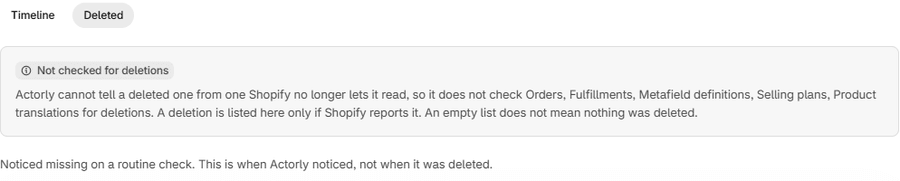
| Not checked for deletions | Actorly cannot tell a deleted item of that kind from one Shopify no longer lets it read, so it does not check those kinds. "An empty list does not mean nothing was deleted." | Check the kind in your Shopify admin. |
| Deletions are not being confirmed for some resources | "Actorly has not been able to check for deletions lately for" the kinds named. "Something missing from your store may not be listed here yet." | Check again later. |
| Noticed missing | A deletion found by a routine check. "This is when Actorly noticed, not when it was deleted." | Use it as "no later than". |
| Showing the most recently deleted items | The tab shows the 50 most recent deletions overall, and older deleted items are not shown here yet. | Use the Data room's Deleted status filter. |
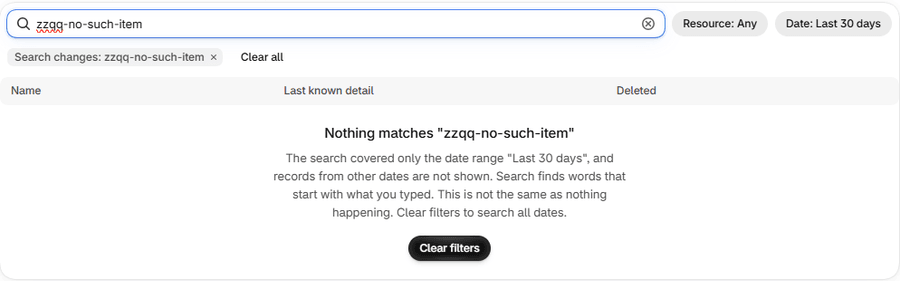
| Nothing matches | A search over the tab found nothing. "This is not the same as nothing happening." | Choose Clear filters. |
Which kinds can Actorly not check for deletions?
The badge Not checked for deletions marks kinds where a missing item cannot be told apart from one Shopify no longer lets Actorly read: orders, fulfillments, selling plans, metafield definitions and product translations. For these, a deletion is listed only if Shopify reports it. Store settings and metafields are exempt from the badge.
For the other kinds, Actorly learns of a deletion in one of two ways. Where Shopify sends a delete notice, Actorly records it. Otherwise a routine check asks Shopify whether each item Actorly holds still exists, and records a deletion only after the item has been missing on two checks. Actorly refuses to record at all when the answer could mean "cannot see" instead of "gone", for example when a permission is missing or Shopify is throttling. So a deletion made a moment ago may not be listed yet, and a very large deletion may not be recorded as one. Overview shows the same gap in Resource types not checked for deletions lately, and in the Deletion check column of Recent changes, which reads Checked lately, Not checked lately or Not checked for deletions.
What can Actorly do with a deleted item?
- Show it. The Deleted tab and the Data room keep the item's record and last recorded values, and its history of changes.
- Export it. On Actorly Restore, an export of your change history includes the changes of deleted items. An export of current items has an Include deleted items option, on by default. See Export your change history to CSV or JSON.
- Not bring it back. Shopify keeps no copy of a deleted item, and Actorly does not recreate one. Restoring a field of a deleted item is refused: "Actorly could not find this in your store. It may have been deleted."
If something goes wrong
- The item is not on the Deleted tab. It may be a kind Actorly cannot check, it may not have been checked yet, or it may have been deleted before you installed Actorly. See A change I made is not showing in Actorly.
- The banner says deletions are not being confirmed. Actorly could not check for deletions lately for the kinds the banner names. This does not mean nothing was deleted.
- The Deleted tab says "Nothing recorded in Last 30 days". The tab kept the Timeline's date range. Choose All time to see older deletions.
A worked example
Sample: you delete a product named "Example tee" in Shopify. Shopify sends Actorly a delete notice for products, so the deletion is recorded and the product appears on the Deleted tab with its name, its last known detail and the time Shopify reports. You delete a menu instead. Shopify sends no notice for menus, so the deletion appears when a routine check finds it, labelled Noticed missing, with the note that this is when Actorly noticed, not when it was deleted. You delete an order: orders carry the badge Not checked for deletions, so the tab may never list it and an empty list proves nothing.
Frequently asked questions
Does Actorly have a copy of my deleted product?
It has the record and last recorded values it held, so you can see what the product was. It is not a product you can put back.
Why does the Deleted tab say No deletions seen?
Either nothing was reported as deleted, or the kinds involved are not checked for deletions. The notice above the list names the kinds that are not checked.
Is a deleted item gone from the Data room?
No. The Data room counts deleted items as "deleted, still kept", and you can filter a kind page by Deleted.
Will a deletion before I installed Actorly appear?
No. Actorly records the deletions it sees after it is installed.
Why does the tab show only some of my deleted items?
The tab shows the 50 most recently deleted items across all kinds, and says "Older deleted items are not shown here yet." The Data room lists them all.
What does "Noticed missing" tell me about when it was deleted?
Only that it was gone when Actorly checked. The time shown is when Actorly noticed, not when the item was deleted.