What does a row in Changes show?
Changes lists every recorded change on the Timeline tab, ordered by the time Shopify says the change happened, 50 to a page. Four counts above the table describe the whole filtered list, not the page: Changes, Resources affected, Deletions and Oldest change.
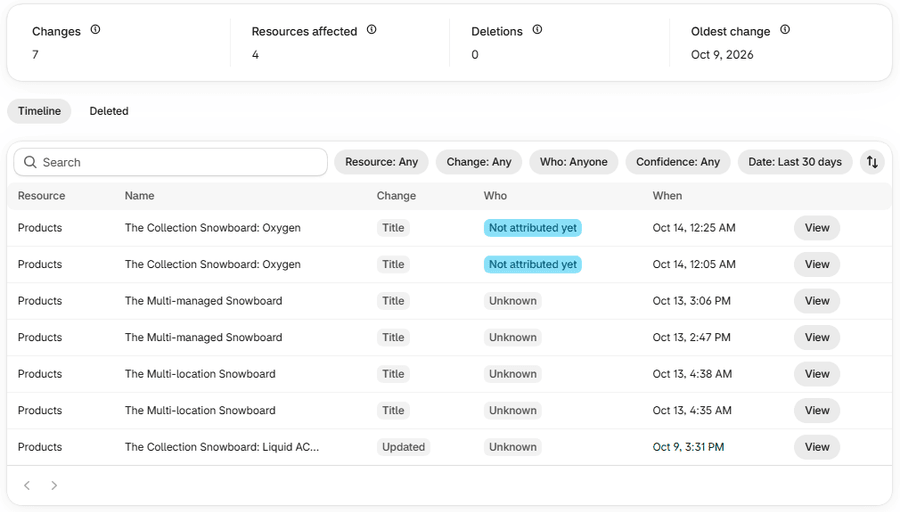
| Column | What it tells you |
|---|---|
| Resource | The kind of record: Products, Collections, Themes and so on. |
| Name | Which record it is. |
| Change | What changed: the field's name when one field changed. Otherwise the kind of change: Created, Updated or Deleted, or for a customer merge Customer merged, Merge failed or Merge not confirmed. |
| Who | The person, app or Shopify, beside how sure Actorly is. Or Unknown, or Not attributed yet. A name longer than 24 characters is cut in the cell. |
| When | The time of the change, in your store's time zone. |
| (no heading) | View, at the end of the row. |
How do I open a change and read it?
What is in every section of the change window?
The window is one scrolling panel. Not every section appears for every change. From top to bottom:
The header and the summary
The header names the kind of record (Product, Variant, Collection and so on), the change (Created, Updated or Deleted) and the time. The summary line says "N fields changed: a, b, c" and, for long lists, "and N more". When a whole record was created or deleted there are no field-by-field changes, and the window says "The whole record was created, so there are no field-by-field changes." or the same for deleted.
What changed
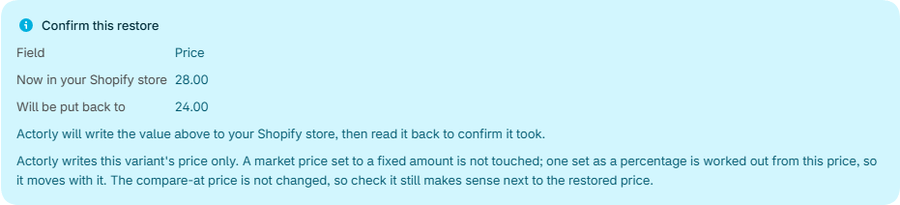
A table of Field, Before and After, with Restore showing either Restore this value or one reason it is not offered: "Not on the restore list", "Protected, so it cannot be restored", "Never stored, so there is nothing to restore", "Added by this change, so there is no earlier value", "Included with Actorly Restore", or "A newer change exists on this field". See What Actorly can and cannot put back.
Who
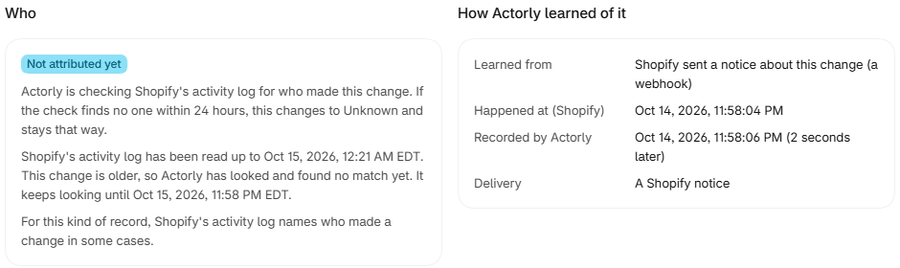
A sentence says what Shopify's activity log does for this kind of record: it names who made a change "in some cases", or "does not name who made a change". Then one line says how this answer was reached: matched to an entry in Shopify's activity log close in time ("Actorly did not see the person do it"); Shopify itself, "as a scheduled or automatic action"; an app, with "Actorly cannot see who used the app"; or "Shopify's activity log had no entry for this change. This will not change later." A change that is still waiting says how far the log has been read. It says Actorly "keeps looking until" a date once the log has been read past the change, and "has not looked yet" when the log has only been read to an earlier time.
How Actorly learned of it
Learned from says whether Shopify sent a notice (a webhook), Actorly found it on a routine check of your store. Happened at (Shopify) and Recorded by Actorly are two times, with the gap in words such as "3 seconds later" or "at the same moment". Delivery appears only for a change learned from a Shopify notice and names it, for example "Product updated"; a notice without a name reads "A Shopify notice". For a record that was deleted, Presence says when and how Actorly found out. For a routine check, "the time Shopify reports is when the record last changed there."
The record at that moment
The full state Actorly recorded after this change, as a version, up to 15 rows with "See all N fields in the Data room". Fields that are protected customer data are counted, not shown. The oldest versions say "This version was recorded before Actorly stored values."
History of this record
A count of earlier changes to the same record, which shows "50+" past fifty, and the five most recent. It says "Recorded since {date}. First version: created." or "install snapshot", and when there are none, "No earlier changes were recorded for this record since {date}." See all changes to this record opens them in Changes.
Restore history
The last five restores of this record, with Date and Outcome, and, only for a restore that stopped, Stopped at and Why. Outcomes read Queued, Running, Restored, Failed or "Not restored, the value had changed". The step a restore can stop at reads "Reading the current value", "Comparing with the current value", "Writing the value", "Reading it back" or "Checking it matched". See Restore one field to an earlier value.
Around the same time, and Orders around this time
Around the same time lists other changes within an hour either side: "Actorly shows what else changed nearby; it does not link them." Orders around this time lists order and fulfilment events from a wider window, by time only. Both sections appear only for changes to orders, fulfillments, draft orders, inventory, products, variants and collections. Orders around this time has three honest empty states: none in the window; "Actorly was not yet recording orders at the time of this change", which "does not mean no orders happened"; and "Actorly's order recording is incomplete, so this list may be missing events." Neither section links one change to another.
Technical details
The Change ID, Shopify ID and webhook event ID, each with a Copy button, and facts such as Topic, Version and Processed after, which have none. A restore's Job ID is here too. They are not needed to read a change.
What do the warnings at the top of a change say?
A banner appears when Actorly cannot promise the history for this kind of record is complete. Each says what that means for what you are reading, and none says nothing happened.
| Banner | What it means |
|---|---|
| History for this kind of record is still being imported | "Actorly is still reading your store, so earlier changes to this record may not appear yet. Not seeing a change here does not mean it did not happen." |
| Actorly could not finish importing history for this kind of record | "Earlier changes to this record may be missing." |
| Actorly cannot say how complete the history for this kind of record is | "Treat what is listed as what Actorly has recorded so far, not as everything that happened." |
| Actorly's check for deleted records is out of date | "A deletion made since the last check may not be recorded yet." |
The banner has a link, See what Actorly has imported.
What if a value is protected, erased or a customer merge?
- Protected. A value linked to a customer is never shown: it reads "Protected, not shown here" or "Not recorded". After an erasure request from Shopify, a name reads "Erased". A value equal to nothing reads "No value".
- A stored code. Where Actorly stored a code, the window shows it as words, such as Active, Draft, Archived or Uploaded. Identifiers are shown only under Technical details.
- A customer merge. The window says Actorly is sent only the two customer ids, "so it does not know who merged them or what either record held at that moment". If the other customer was not already tracked, Actorly never held its details. A merge Shopify reported but did not confirm reads "Merge not confirmed".
If something goes wrong
- "We could not load this change. Try again." Choose Try again. The window only opens when it has loaded.
- "This change could not be found." The link may point at a change that no longer exists. See How long Actorly keeps your history, and storage.
- There is no Restore this value. The Restore column gives the one reason. For "Not on the restore list" it adds a Why not link that opens the coverage window on that kind.
- A change you expect is not in the list. See A change I made is not showing in Actorly.
A worked example
Sample: a staff member changes a product's title from "Example tee" to "Example tee, blue". In Changes a row appears with Resource Products, Change Title, and in Who Not attributed yet. In the window, What changed shows Field Title, Before "Example tee", After "Example tee, blue", Restore Restore this value. Who says Actorly is checking Shopify's activity log and, in a line below, how far the log has been read and whether Actorly keeps looking. How Actorly learned of it says Shopify sent a notice, with the two times a few seconds apart. Later the same row may show a staff name with Likely or Possible, or Unknown, which then stays. Nothing in the window says why the title changed.
Frequently asked questions
Why does a change have no before and after?
A record that was created or deleted as a whole has no field-by-field changes. Actorly shows that it happened and when.
Does Actorly show every change in my store?
No. It records the parts of a store it tracks, and each has its own limits. See What Actorly records in your Shopify store.
Why does one edit show as several changes?
A change is one edit to one resource. A bulk edit that touches 40 products counts as 40 changes.
What does "Not attributed yet" mean in the Who column?
Actorly is still checking Shopify's activity log for who made the change. If it finds no one by the date the Who panel shows, it becomes Unknown and stays that way. See Why a change says Unknown or Not attributed yet.
Why is a change I made last night dated the next day?
The When column is shown in your store's time zone, so a row is not re-dated. A date range can still put its edge on another day: Today is your store's day, Last 7, 14 and 30 days count back from now in blocks of 24 hours, and This month, Last month and Custom count UTC days.
Can I put the old value back from here?
If the field is one Actorly can put back, the window offers Restore this value. See Restore one field to an earlier value.
Does "Around the same time" mean the changes are linked?
No. It lists what else changed within an hour, by time only. Actorly does not link them, and Shopify gives timing, never a reason.