How do I find what one person or app changed?
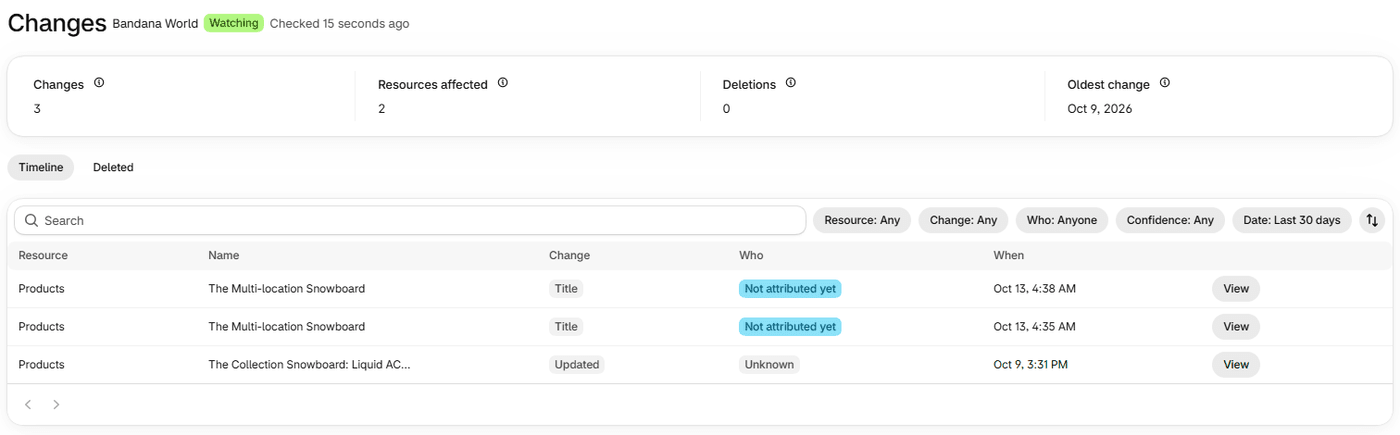
How does search work?
The search box is labelled Search changes. It matches the start of words, ignoring case and accents, so "prod" finds "product". Every word you type of two or more characters is treated as the start of a word, a one-character word must match exactly, and all your words must match, in any order. Punctuation separates words, and at most 12 words are used.
It searches four things: the change summary, the item's name, the field names and the stored values. It does not search who made a change, dates or the Source. A person's or app's name is found by the Who and name filters, not by search. Customer values that Actorly protects are held back from the search index, so they cannot be found by search.
What can I filter by?
| Filter | The choices | Notes |
|---|---|---|
| Resource | The kinds Actorly records changes for, such as Products, Collections, Discounts and Themes | Only kinds Actorly can currently record are offered. |
| Change | Created, Updated, Deleted, and the customer-merge outcomes | |
| Who | Anyone, Staff member, App, Shopify, Actorly, Unknown, Not attributed yet | No change carries Actorly as its actor today, so that choice can return nothing. |
| Staff name or App name | A staff member or an app | Appears after you choose Staff member or App. |
| Confidence | Likely, Possible, Unknown, Not attributed yet | A row can also read Investigating, but that is not a filter choice. |
| Date | Today, Last 7 days, Last 14 days, Last 30 days, This month, Last month, All time, Custom | The Timeline opens on Last 30 days. A direct link to the Deleted tab opens on All time. |
Clear all removes every filter. A button at the end of the row sorts by time: Newest first or Oldest first.
How the date ranges are counted
Today is your store's calendar day. Last 7 days, Last 14 days and Last 30 days count back from now in blocks of 24 hours. This month, Last month and Custom count UTC days, so if your store is far from UTC a change made late in the evening can fall on the next day at the edge of those ranges. Rows are ordered by the time Shopify says the change happened, not the time Actorly received it. A page holds 50 rows.
The four counts
Changes, Resources affected, Deletions and Oldest change describe the whole filtered set, not the page. "One item changed forty times counts once" under Resources affected. The trend beside a count appears only when a whole earlier period of the same length exists after you installed.
What does it mean when nothing matches?
An empty result says why, in words that never claim your store was quiet.
| What the page says | What it means | What to do |
|---|---|---|
| No changes match these filters | "Your history has not changed, this view of it has." | Choose Clear filters. |
| Nothing matches "your words" | "Search finds words that start with what you typed", so "prod" finds "product". | Try a shorter or different word. |
| Nothing recorded in the range | "Records from other dates are not shown, so this is not the same as nothing happening." | Choose All time or Clear filters. |
| Nothing recorded in Last 30 days | The default window emptied a complete history, so it counts as a filter and says so, not "No changes yet". | Choose a longer range. |
| Still building your history | The first import is still running. | Wait. See Is Actorly recording my store? |
| Outside your plan's history | History before the date shown is outside your plan's window. | See the plan section below. |
A link that carries a Who filter Actorly does not offer is refused, and says so: "A filter in this link was not applied". The list is not narrowed by it, so do not read the list as a result of that filter.
How far back does search reach?
As far as your plan keeps history: 3 months on Actorly Watch, unlimited on Actorly Restore. History before your plan's window is outside your plan, the list says so with the date it applies from, and removed history cannot be brought back. See Compare Actorly Watch and Actorly Restore.
Can I export what I am looking at?
On Actorly Restore, build an export in the Data room, choosing the date range and resource type there. On Actorly Watch, exporting is part of Actorly Restore. See Export your change history to CSV or JSON.
A worked example
Sample: you want to know which apps changed products this month. Choose Date: This month, Resource: Products, Who: App. The list narrows to product changes made by apps, and the counts above follow. Add Confidence: Possible to see only those where several entries named the same app. Now type "tag" in the search box: only changes whose summary, item name, field names or values contain a word starting with "tag" remain. Clear all returns to the full list.
Frequently asked questions
Can I search by a person's name?
Not in the search box. Use the Who filter, choose the staff member or the app under Name, then read each row's confidence word.
How far back does search reach?
As far back as your plan keeps history: 3 months on Actorly Watch, unlimited on Actorly Restore.
Why can I choose a Name only after choosing Staff member or App?
The name list holds the staff members and apps Actorly has recorded, labelled Staff name or App name, so it applies only to those two kinds. Shopify, Actorly, Unknown and Not attributed yet carry no name.
Why is the Deleted tab showing the same date range as the Timeline?
It does not change. The range you have is kept when you switch tabs, including the default Last 30 days, so the Deleted tab can show "Nothing recorded in Last 30 days" until you choose All time. A direct link to the Deleted tab opens on All time.
Does the Who filter guess?
No. A name is shown only when an entry in Shopify's activity log lines up with the change, and it carries a word for how sure Actorly is. Shopify gives timing, not certainty, so the strongest word is Likely.
Why is the list shorter than I expected?
Check the Date filter: the Timeline opens on Last 30 days. Choose All time to see the rest, up to your plan's history window.
Why did a link not apply my filter?
A link carrying a filter Actorly does not offer is refused: "A filter in this link was not applied". The page says which, and the list is not narrowed by it.