What is on the Data room page?
The page says "Everything Actorly holds about your store, and the history behind every value." It opens with a reminder that matters for every number on it. Actorly has no before-and-after values for changes made before it was installed, and cannot put those values back.
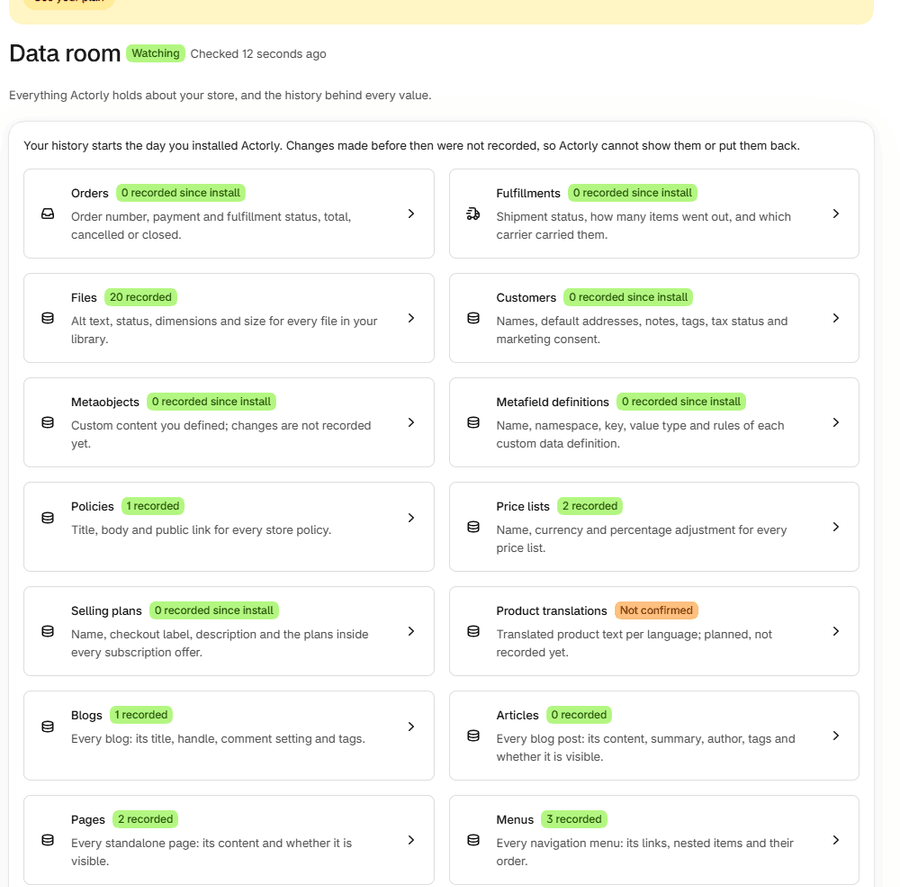
Each card names a kind of record, says what Actorly holds for it in one line, and carries one badge. There is also a Theme backup card, which opens the theme backup page.
| Badge | What it means |
|---|---|
| N recorded | Actorly read the current holding of this kind when it was installed, so the count is what Actorly read then, plus what has changed since. |
| N recorded since install | Actorly does not import this kind at install (orders, customers, fulfillments, draft orders, selling plans, metafield definitions, metaobjects). The count is what was recorded since you installed, at any number, zero included. |
| Still importing | The first import of this kind is running, so the count is real but partial. |
| Not confirmed, Import failed | Actorly has not confirmed, or could not finish, importing this kind. Treat the count as incomplete. |
A card also says "N deleted, still kept" when Actorly holds deleted items of that kind.
How do I find one item and its history?

For one product's whole story in one place, see See one product's full history.
What does a kind page show?
A kind page lists items, newest activity first, with a Tracked or Deleted badge in the Actorly column. A button, About this data, explains what Actorly records for that kind. Above the list, a status line says whether that kind is ready. When the Status filter is set to Deleted, a banner says if Actorly has not been able to check this kind for deletions lately.
| What the page says | What it means |
|---|---|
| Actorly is still importing these, so this list will grow. | The first import of this kind is running. |
| Actorly does not watch this yet | "There is nothing to show because Actorly is not recording this kind of thing, not because your store has none." |
| Nothing held yet | "Actorly is not holding anything of this kind for your store yet." |
| Not checked for deletions | Actorly cannot tell a deleted item of this kind from one Shopify no longer lets it read. An empty Deleted list does not mean nothing was deleted. |
| That import did not finish | The import of this kind failed. |
| We could not read your history | Actorly could not read the list. This does not mean the list is empty. |
What does an item window show?
The window splits What has changed from Everything else Actorly holds. If the record cannot be opened, it says "This record was not found": "Actorly holds nothing under this ID. The link may be old or mistyped, or the record may not have been read yet." If Actorly cannot read it, it says "Actorly could not read this right now": "This is a problem on Actorly's side, not with your store. Your history is not affected and nothing has been lost."

- What has changed has one row per field that has changed, with Field, What changed (the value before and the value after, where Not set before is the before side of a field that was added) and History, a line such as "Changed 3 times, most recently" a date.
- Everything else Actorly holds lists the fields that have not changed, with Field and Value now, with "These values have not changed since Actorly started recording them." When no field has changed but changes were recorded on the record, the window says so: "Actorly recorded N changes to this record. None of them has a before and after for the values below." For one change it reads "Actorly recorded 1 change to this record. It has no before and after for the values below."
- A record that Actorly first saw at install carries one line above both tables: "Actorly first recorded this on {date}. The values were already set before then, and Actorly cannot tell for how long." A record created while Actorly was watching says "Created on {date}, while Actorly was watching."
- An empty value reads Empty. Long values have Show more and Show less.
Protected customer values are marked, not shown. A stored code appears as words: a product's status reads Active, Draft, Archived or Unlisted; a theme reads Live, Not live, Development, Demo, Archived or Locked; a file's status reads Uploaded, Processing, Ready or Failed.
What else lives in the Data room?
- Export. Build a CSV or JSON file of your history on Actorly Restore. See Export your change history to CSV or JSON.
- Storage. See what is stored shows what is taking the room. See How long Actorly keeps your history, and storage.
- Theme backup. The Theme backup card opens the theme backup page. See Download a theme backup as a ZIP.
If something goes wrong
- A card says "0 recorded since install" and your admin has orders. That is the since-install rule, not a bug. Actorly does not import past orders.
- A kind page is empty. The page says which case it is: still importing, not watched yet, nothing held yet, that the import did not finish, or that Actorly could not read your history. None of them says your store has none.
- A card says Import failed. The page and Overview say so, and "It is not retrying automatically yet". Tell support which kind.
A worked example
Sample: you open Data room > Products and search "tee". The list shows "Example tee", Actorly Tracked, Status Active, Changes 43, with a Last seen date. You choose View. Under What has changed you see Description changed 3 times and Tags changed 11 times, most recently on a given date; under Everything else Actorly holds you see the title, vendor and other fields that have never changed since recording began. Nothing on the page says who made those edits: the Who and confidence words are in Changes.
Frequently asked questions
What is the difference between the Data room and Changes?
Changes is a timeline of every recorded change. The Data room is organised by item: what Actorly holds for each one, and its history.
Why does a card say "0 recorded since install"?
Actorly does not import that kind when it is installed. It records it from its first change after you installed, and none has happened yet. It is not a statement that your store has none.
Where do I export my history?
Export is a section of the Data room, on Actorly Restore. On Actorly Watch you can read your history in the app, for the 3 months it keeps.
Does the Data room include deleted items?
Yes. Set the Status filter on a kind page to Deleted. Actorly keeps the deleted item's record and last recorded values.
Why does an item say Actorly "cannot tell for how long" a value was set?
The value was already set when Actorly first recorded it, so Actorly has no earlier version to compare with.
Can I see who changed a field here?
No. The Data room shows values and when they changed. Who made a change, with how sure Actorly is, is in Changes.