What do I need before I install?
You need a Shopify store and the ability to install an app on it. Actorly runs inside your Shopify admin, so there is no separate account to create and no code to paste.
Actorly adds nothing to your storefront: no scripts, no theme code, no app blocks and no tracking pixels. It asks Shopify for read permissions for the kinds of record it keeps history of, and for five write permissions (products, shipping, locations, markets and files). Those five are used only when you confirm a restore of a field Actorly can put back. Actorly does not ask to write themes, inventory, discounts, content, policies or translations, so it cannot change them.
What happens when I install, step by step?
What do I see while the first import runs?
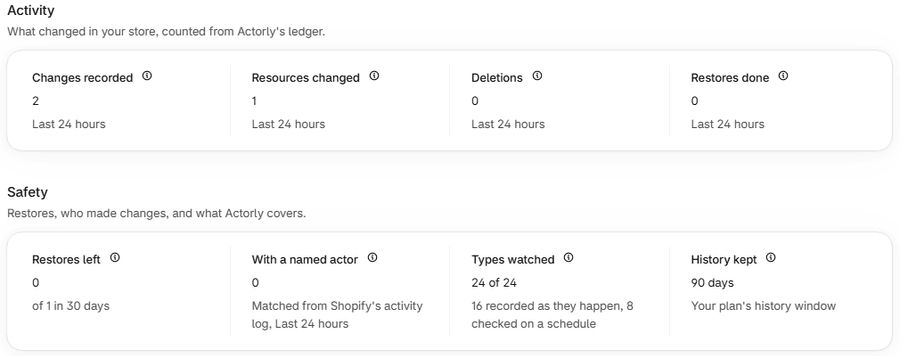
The first import starts at install, not when you pick a plan, so some kinds may already be ready when you first see the dashboard. Actorly states no time for the import: a larger store simply has more to read. While it runs, the app tells you what it cannot yet say, and never shows 0 for something it has not read.
| Where | What it says | What it means |
|---|---|---|
| Status badge beside the store name | Still importing | The first read of at least one kind is running. |
| A count on Overview | A dash and the reason, for example "Still building your history" | The count is not available yet. It is not 0. |
| Types watched | "N of N" counting up | Only kinds Actorly has finished importing are counted. |
| Recent changes | "Nothing is being watched yet" or "Still building your history" | There is nothing to show yet. This is not the same as nothing having changed. |
| The banner at the top | A list of the kinds still importing | Counts for those kinds are incomplete until their import finishes. |
| Checked on a schedule | "Not checked yet" | The first scheduled check has not run. |
| Trend badges | None | A trend needs a whole earlier period after the install. |
If the badge says Import failed, the page says "That import did not finish" and "It is not retrying automatically yet". The app says it is not retrying automatically yet, so tell support which kinds the banner names. See Is Actorly recording my store?.
What does Actorly record from day one, and what only from the first change?
Kinds Actorly can list at install, such as products, collections, files, locations and markets, are read at install and read again every Sunday. Each has a first version called "install snapshot", which is the starting point later changes are compared with.
Orders, customers, fulfillments, draft orders, selling plans and metafield definitions start empty and fill as changes arrive. That is why a card in the Data room can read "0 recorded since install" while your Shopify admin shows orders. While a kind is still importing, a record Actorly sees for the first time is kept as its starting version and does not appear as a change.
Pages, blogs, articles, menus, URL redirects, price lists, policies and files work differently again. Shopify sends Actorly no change notice for them, so Actorly re-reads them on a schedule: weekly on Actorly Watch, daily on Actorly Restore. A change to one of those appears at the next check.
A worked example: your first recorded change
Sample: you edit a product's title in Shopify. Open Changes in Actorly's menu. A row appears with the Resource Products, the product's name, the Change Title, and in the Who column Not attributed yet. Choose View to see the value before and after, and in the window a sentence that says Actorly is still checking Shopify's activity log for who made the change. That word can change to a name with a confidence word, or to Unknown, which then stays.
This is also the first step of the Setup guide's "Try a restore": edit a product title in Shopify, open that change in Changes and choose Restore this value. The steps are in restore one field to an earlier value.
What is different on Actorly Watch and on Actorly Restore?
| Actorly Watch | Actorly Restore | |
|---|---|---|
| Price | $0, free forever, no trial and no countdown | $29 per month, or $240 a year |
| Change history | 3 months of change history | Unlimited change history, kept while you stay on Actorly Restore |
| Restores | One restore every 30 days, on the basic fields. A product's status, a variant's price and a collection's sort order are not included | Unlimited restores |
| Export | Not included | CSV or JSON, built in the Data room |
| Theme file backup ZIP | Not included | Included |
| Scheduled kinds (pages, menus, files and others) | Checked weekly | Checked daily |
| What Actorly watches, who made a change, before and after values, search and filters | The same | The same |
This lists the main differences, not every line on the plan cards. See Compare Actorly Watch and Actorly Restore.
If something goes wrong
- You paid and still see the plan screen. Actorly confirms your plan by reading it from Shopify, and the read can lag. If it fails, the Account page says "Actorly could not confirm this plan with Shopify" and treats you as being on Actorly Watch until it can confirm. See upgrade, downgrade or cancel.
- A count is a dash. That is the app saying it has not read that kind yet. Wait for the import, or read the banner for the reason.
- Changes is empty. The words on the empty page say which case it is. See Is Actorly recording my store?.
Frequently asked questions
Do I need to set anything up?
No. Actorly started recording the moment it was installed, and there is nothing here to set up. You only choose a plan.
Can I use Actorly Watch without going to Shopify's billing page?
No. Choosing a plan, including the free one, happens on Shopify's page. Actorly shows your dashboard once it has read your confirmed plan.
Can Actorly show what changed before I installed it?
Actorly has no before-and-after values for changes made before it was installed, and cannot put those values back.
Does Actorly change my storefront or my theme?
No. Actorly adds no scripts, theme code, app blocks or pixels. It writes to your store only when you confirm a restore of one of the fields it can put back, and it cannot write a theme at all.
How long does the first import take?
Actorly does not say. It depends on how much your store holds, and the app shows progress by marking what is still importing.
Is there a trial?
No. Actorly Watch is free, with no trial and no countdown. Actorly Restore has no trial either.
Can I try Actorly Restore on a development store?
A development store is a test store and is never charged. Shopify's own plan screen says "These plans are free to test on this store."